Based on the same unique software and rugged hardware platform as the rest of the Makin’ 3D product range, Makin’ PerFormans provides an easy-to-use quality assurance tool with full integration and connectivity to the workflow in the project.
Bluetooth connectivity
Decimeter accuracy for quality control
RTK GNSS with NTRIP
Increase quality control, performance, and gain efficiency in your construction activities.
An intuitive and practical project management tool for visualizing project data in real time, without the need for additional equipment.
Decimeter positioning accuracy for valuable project information and allows for smart planning and immediate detection of deviations from design.
Makin’ PerFormans is workflow-integrated with all other Makin’ solutions.
Increase quality control, performance, and gain efficiency in your construction activities.
Access to up-to-date data creates better communication, better decision-making, and fewer misunderstandings.
Digital tools help create higher accuracy in project planning and project progress checks.
MAKIN PerFormans
The 3D model in your hands: anywhere on site
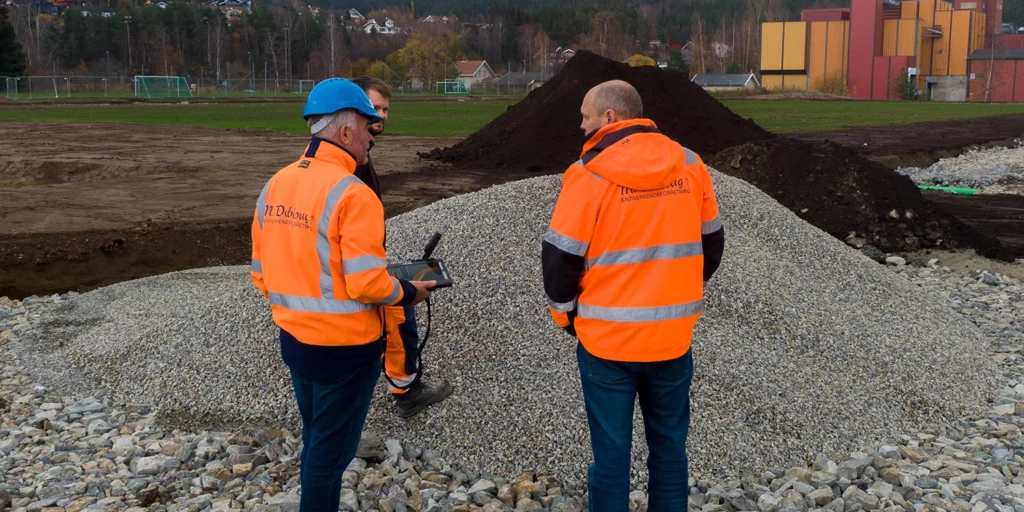
MAKIN PerFormans takes the same 3D software your machines use and puts it in the hands of the people who run the site. A rugged tablet and a compact GNSS receiver show your exact position against the project design. You can walk the site, drive it in a UTV or check it from the car: see what is built, what is left, and where everything should go.
You run the site. MAKIN PerFormans gives you the overview to stay one step ahead.
Why contractors choose
MAKIN PerFormans
Answers on the spot
Check positions, heights and design details yourself without waiting for a surveyor.
Same model as the machines
PerFormans uses the same MAKIN Cloud project as your excavators, wheel loaders and compactors, so everyone works from the same plan.
See your machines live
Other MAKIN machines and devices working on the project appear on your screen.
Document as you go
Log points and lines with photos and attributes while you walk the site.
MAKIN PerFormans
How it works
01
Connect the receiver
The compact GNSS receiver pairs with the tablet over Bluetooth.
02
Get a precise position
Corrections via NTRIP or UHF radio give the receiver an RTK position.
03
Work against the design
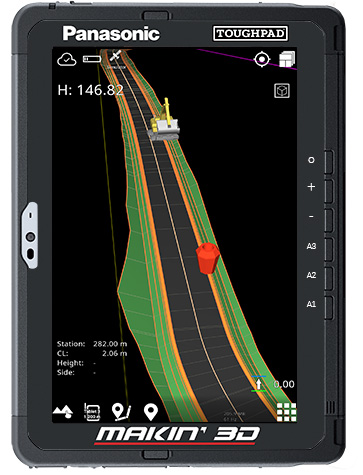
The MAKIN3D software shows where you are in the 3D model, with height and side distance to the design.
MAKIN PerFormans
Key features
Use it your way
Mount the tablet on a pole, attach it to a UTV or use it inside a vehicle. You can save a height setting for each setup and switch between them in seconds.
See the design in 3D
View the project in 3D or from above, with maps in the background. Rotate the view to north, to the centerline or to your direction of travel.
Stakeout
Find points and lines in the design and get guidance straight to them.
Infield design and volume calculation
Create points, lines, boundaries and surfaces on the spot, calculate volumes and send a report to MAKIN Cloud.
Virtual plane and temporary profile
Set up a flat or sloping plane, or a cross-section profile, right on the tablet without a design file.
As-built logging with photos
Log points and lines with objects, attributes and photos. Download them from MAKIN Cloud as CSV, KOF or XML, or export them straight to a USB stick.
Supports the file formats you already use
Import LandXML, DXF and KOF files from the cloud or from a USB stick.
Secret projects
Some jobs need extra confidentiality. Their data can stay on the tablet only and never syncs to the cloud.
Chat and remote support
Message the office or the machine operators directly from the tablet. MAKIN support can connect remotely to help you.
Always up to date
Software updates come automatically to the tablet when you have a valid maintenance license.
Built for the job site
PerFormans runs on rugged tablets: Advantech AIM-76S, Panasonic FZ-A3 or Mesa 3. New users learn fast through MAKIN Learning, our online course platform, and can practise in demo mode.
FAQ
Frequently asked questions
Who is MAKIN PerFormans for?
Foremen, site managers and anyone else on site who needs to see the design and check the work without sitting in a machine.
How accurate is it?
PerFormans uses RTK GNSS for positioning. Height measurements have an accuracy margin of about 10 cm, which makes it ideal for overview, checks, navigation and documentation. For precise grading, use MAKIN machine control on the machine.
Can I use it in a vehicle?
Yes. You can save different height settings for a pole, a UTV or a car and switch between them.
Does it work with my MAKIN machines?
Yes. PerFormans uses the same projects in MAKIN Cloud, and you can see other MAKIN systems working on the same project.
Which GNSS correction sources are supported?
NTRIP and UHF radio.
Ready to take the model with you?
Contact your local MAKIN dealer for a demo or contact us.